2-Model GCDs
-
source model
-
flat
The 2-Model Machining process group also introduces a new property “Is Stock Surface” for planar face, curved wall, and curved surface GCDs.
For information about machining GCDs that are not specific to 2-Model Machining, see Stock Machining and Machining .
Source model GCD
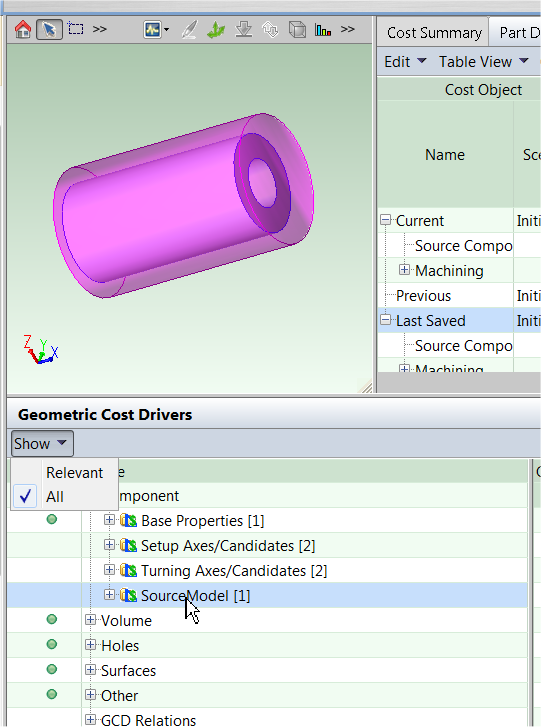
The source model GCD allows you to visualize the difference between the initial raw part (the “source” model”) and the finished machined part by displaying a transparent representation of the source model while you are viewing the finished model.
To view the results of the simple 2-Model Machining costing described above:
-
Ensure that the costed 2-Model Machining part is open.
-
In the Geometric Cost Drivers panel, expand the Component GCD in the Name column.
-
Click SourceModel in the Name column.
The component viewer updates to display the finished part, with the volume of the initial part highlighted in magenta around it.
Flat GCD
The flat GCD applies only to 2-Model Machining, and represents geometry that is typically spot-faced (for example, to clean off a surface so that it mates better with another part or fastener). It typically is generated only for geometry that is milled and not turned, as Ring GCDs typically will be generated for turned geometry.
The Flat GCD has three properties: Depth, Volume, and Removed Volume. Removed Volume defines a volume with a planar bottom and (optionally) walls that are vertical and orthogonal to the bottom, and represents the source part material removed to reveal the machined surface. For example, you might have a boss that rises vertically above a surface. 2-Model Machining determines that since the part cannot be turned along the axis of the boss, the volume that needs to be milled away to reach the top surface of the boss should be represented by a flat rather than a ring.
Note that in the component viewer, only the planar bottom of a selected flat is highlighted (as a surface) to simplify the display, even though a flat actually has volume. In the example below, the flat actually includes the volume rising orthogonally above the highlighted surface.

The 2-Model Machining process group also has some configurable logic about how to extract GCDs corresponding to machined hole features.
If the diameter of a hole is below a threshold defined by site variable Maximum Turned Hole Diameter, aPriori extracts it as a partially-filled simple hole equal in shape to the simple hole in the final CAD model. This permits it to be machined with typical hole-making operations such as drilling. However, if it is bigger than the threshold, aPriori extracts it as a ring that partially fills the simple hole in the final CAD model, assuming that it is to be turned.
GCD property “Is Stock Surface”
The GCD property Is Stock Surface set to “true” only the if the surface (planar face, curved wall, or curved surface) of the finished model is coincident with a surface of the source model.
